

Showing posts with label KNOW HOW (TRICKS N HACKS). Show all posts
CHANGE PROCESSOR NAME IN WINDOWS
CHANGE YOUR PROCESSOR NAME
IN WINDOWS

Are you bored with your old processor? Do you want a new processor with a breath-stopping name but are not going to upgrade any time soon? No need to worry. You can still have that new processor's name displayed in your computer. Well not only that, you can also have a better one than the one you are supposing to buy. Just follow this trick.
SO HERE THE TRICK TO CHANGE IT
To change processor's name displayed in your computer, follow these steps:-
- Click on Start.
- Click on Run.
- Type "regedit" without quotes.
- Navigate to HKEY_LOCAL_MACHINE/HARDWARE/
- From HARDWARE, navigate to DESCRIPTION/System/CentralProcessor/.

- In the work area, double click on ProcessorNameString, and change its value according to your choice.
- Click OK and open your computer properties and name of processor will be changed.

STILL HAVE PROBLEM?
WATCH THIS VIDEO
CONVERT FAT32 TO NTFS FILE SYSTEM WITHOUT FORMAT.
CONVERT FAT32 TO NTFS WITHOUT FORMAT.

While it is generally recommended to use the NTFS file system because of its stability, security and lesser defragmentation time, most of us end up using FAT32 because that is what most disks are preformatted with. Unless, we notice the “Not enough disk space error” despite disk space being available, we don't bother to change the file system. Moreover, most of us don't change it because of the risk of losing important data and lack of time (read laziness). As Microsoft was aware of this scenario, they added a capability in the command prompt to overcome this by executing a simple command. There are many software that support this too but the Convert command is one of the easiest ways to do so. Follow the steps below to know how:-
Important: While this method works perfectly, I would still advise you to backup your data in case anything goes wrong.
STEPS TO CONVERT.
- FIRST CHECK THE DRIVE NAME WHICH IS IN FAT32 AND U WANT TO CONVERT IN NTFS.
- OPEN CMD
- TYPE THIS chkdsk h:/f FOR CHECKING ERROR . HERE MY DRIVE IS H.SO IF U R DOING IN OTHER DRIVE THEN MODIFY IT. FOR EXAMPLE IF YOUR DRIVE WAS C THEN CODE WILL BE chkdsk c:/f
- WAIT FOR FINDING ERROR .
- NOW FOR CONVERTING TYPE THIS Convert H:/FS:NTFS . IF YOUR DRIVE IS C THEN TYPE THIS convert c:/fs:ntfs .
- WAIT FOR COMPLETING.
- ENJOY
STILL HAVE PROBLEM?
WATCH THIS VIDEO
How to Download Youtube Videos Without Any App.
HELLO EVERY BODY..
WE ARE SHARING THE TRICK TO DOWNLOAD YOUTUBE VIDEOS WITHOUT ANY SOFTWARE.
THIS TRICK IS WORKING ON EVERY OS LIKE LINUX/WINDOWS/ANDROID/SYMBIAN/JAVA....
WE ARE SHARING THE TRICK TO DOWNLOAD YOUTUBE VIDEOS WITHOUT ANY SOFTWARE.
THIS TRICK IS WORKING ON EVERY OS LIKE LINUX/WINDOWS/ANDROID/SYMBIAN/JAVA....
SO HERE THE TRICK
- JUST OPEN YOUTUBE WITH ANY BROWSER U LIKE
- SEARCH FOR YOUR FAVORITE VIDEO WHICH U WANT TO DOWNLOAD

- NOW GOTO URL BOX AND COPY THE LINK OF THAT VIDEO

- NOW OPEN THIS SITE http://savefrom.net

- NOW SIMPLY PASTE OF THAT VIDEO IN SAVEFROM.NET WEBSITE AND CLICK DOWNLOAD

- NOW SELECT THE QUALITY U WANT TO DOWNLOAD
- FILE DOWNLOAD WILL BE STARTED
ENJOY THIS EASY TRICK
STILL HAVE PROBLEM ?
WATCH THIS VIDEO
STILL HAVE PROBLEM ?
WATCH THIS VIDEO
Android Reverse Tethering for Windows
Android Reverse Tethering

Android Reverse Tethering for windows users
Tethering is the ability to surf on your pc using the 3g of your phone
Reverse tethering is the opposite : surf on your phone using the ADSL of your PC. No Wifi or 3G connection required.
!! This will only work for rooted users !!
Installation :
Unpack the rar file. This rar files contains the windows part, ADB and the android APK.
Before starting the tool :
- Make sure you have ADB drivers installed for your device.
The low level communication tool (ADB) is included in the rar file.
AndroidTool will try to find ADB in c:\android-sdk-windows\platform-tools\adb.exe
If not found he will use the provided one.
The first time you use the program :
If you want to use another version of ADB, click "config" and in the first tab enter the path to the ADB.
Select the DNS server to use in the right list. On complex system, some DNS can be detected.
Start Reverse Tethering
Just click “Connect”.
If it's the first time you use the program, This will install the latest android package and the dependencies (busybox and redsocks).
The SuperUser process may ask you to allow “Usb tunnel”

If the android process crash after receiving superuser rights, close the windows program and start again.
The android interface (first tab) will show connections forwarded to windows.
Others tabs are just for debugging. Send the log on this thread in case of problem.
Others tabs are just for debugging. Send the log on this thread in case of problem.
Start your browser
Google chrome will complain that no connection is available. Don’t care. That work.
Firefox , opera , maxthon and dolphin don’t have problem with that !!!
The current version of the application can’t forward low level ICMP packet (PING).
From Android OS point of view, there is no internet connection.
Firefox , opera , maxthon and dolphin don’t have problem with that !!!
The current version of the application can’t forward low level ICMP packet (PING).
From Android OS point of view, there is no internet connection.
Command line prompt :
The windows tool is a "One click" application. Just click the "Connect" button.
But you can add parameters to directly connect when the program start.
But you can add parameters to directly connect when the program start.
Here are the supported commands : Device:xxxx (where xxxx is the device ID), Connect, Disconnect, KillAdb, LogToClipboard, Show, Hide, Quit
Parameter sample : Device:123465789 Connect Hide
Create a second shortcut with Disconnect Quit parameters to stop connection and close the application.
Google Market/Play :
This step is optional, required only if you want to download from market.
This will install some low level program.
This will install some low level program.
The Xposed framework author and me are not responsible for anything you do with your phone/tablet/rice cooker.
This work for android 4.X, but an experimental version of the Xposed framework for Gingerbread made by liudongmiao can be found here : XDA thread
On the windows program, go to tools tab and click "install hack"
Launch the Xposed Installer (you just installed) on your android and click on "Install/Update"
Launch the Xposed Installer (you just installed) on your android and click on "Install/Update"
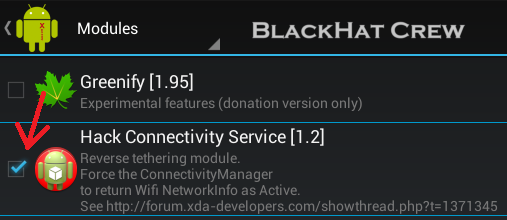
Go to the module tab and check the HackConnectivityService (see screenshot below)
Reboot the phone
Done!
This work for market but also for some other programs (some games,skype,hangouts...)
For older android 2.x or 3.x version :
The application want to have an active 3G or Wifi network interface.
Some market applications are tagged "Wifi" only.
Some market applications are tagged "Wifi" only.
To get around this problem, you can activate the 3G BEFORE starting reverse tethering,all the data will goes to the usb.
Tips : You can connect to some wifi hotspot not protected by a key.
It's only when you want to surf that the hotspot ask you a user/password.
But, at this point, we have an 'active' connection. Market download should work after starting reverse tethering.
Troubleshooting
The tool is not compatible with "CrossBreeder" or other tools that change the host file (removing localhost)
If your device is not listed in the "select a device" combobox :
If the connection shutdown often, try another USB cable.
Android 4.3 and 4.4 Troubleshooting
Google added some security stuff on this version.
Important : You have to connect your phone/tablet to wifi or 3g at least once after boot before using reverse tethering !!
Proxy :
There is 2 problems with proxies :
Android 3G proxy. Even if 3g is deactivated, your provider (APN) proxy may still used by applications.
The windows tool is not able to communicate with your provider proxy.
Note that not all providers include a proxy. You must remove it manually.
The tool will give you information on how to do it when detected.
Corporate proxy. The windows application is not able to traverse proxies.
The good news is that you can use some applications like FreeCap , sockscap and proxifier.
You must start the AndroidTool from one of these launchers, giving proxy address and port.
DOWNLOAD HERE
Password: blackharcrew
If your device is not listed in the "select a device" combobox :
- Ensure Usb debugging is enabled (Settings > Applications > Development > USB Debugging > Turn On). Deactivating and reactivating the Debug mode may help
- The ADB subsystem is sometimes not working properly. Click the "Kill ADB" button (on Tools)
- Your device is perhaps not installed properly. See your device manufacturer. You can download a generic driver from google here : Download Link
- Windows can detect your device as a "Media Transfer Protocol" (MTP) or "Picture Transfer Protocol" (PTP). When you connect the usb cable, you have a notification. Click the notification to change this parameter. If one don't work, take the another one...
If the connection shutdown often, try another USB cable.
Android 4.3 and 4.4 Troubleshooting
Google added some security stuff on this version.
Important : You have to connect your phone/tablet to wifi or 3g at least once after boot before using reverse tethering !!
Proxy :
There is 2 problems with proxies :
Android 3G proxy. Even if 3g is deactivated, your provider (APN) proxy may still used by applications.
The windows tool is not able to communicate with your provider proxy.
Note that not all providers include a proxy. You must remove it manually.
The tool will give you information on how to do it when detected.
Corporate proxy. The windows application is not able to traverse proxies.
The good news is that you can use some applications like FreeCap , sockscap and proxifier.
You must start the AndroidTool from one of these launchers, giving proxy address and port.
DOWNLOAD HERE
Password: blackharcrew
How to bypass Adf.ly,Linkbucks.com,Adfoc.us
How to bypass Adf.ly, Linkbucks.com, Adfoc.us
These days we know that there are many things for us in internet but sometimes we can't download them because of Adf.ly, Linkbucks.com, Adfoc.us.
IN this post we are going to teach a simple trick to bypass Adf.ly and other URL shorters without any VPN software.
These day there are many adf.ly link bypassers in internet. Their names are following:
www.adf.boxxod.net/
http://adbypass.appspot.com/bypassnow.html
http://bypassshorturl.com/
But here we are going to user adf.boxxod.net
Goto adf.boxxod.net/
Make sure you have your adf.ly url.

This bypasser helps you to get the link behind adf.ly without seeing the ad shown by Adf.ly.
You can try other bypassers mentioned here and comment us.
These days we know that there are many things for us in internet but sometimes we can't download them because of Adf.ly, Linkbucks.com, Adfoc.us.
IN this post we are going to teach a simple trick to bypass Adf.ly and other URL shorters without any VPN software.
These day there are many adf.ly link bypassers in internet. Their names are following:
www.adf.boxxod.net/
http://adbypass.appspot.com/bypassnow.html
http://bypassshorturl.com/
But here we are going to user adf.boxxod.net
Goto adf.boxxod.net/
Make sure you have your adf.ly url.
This bypasser helps you to get the link behind adf.ly without seeing the ad shown by Adf.ly.
You can try other bypassers mentioned here and comment us.
Enjoy Bypassing links !!
STILL HAVE PROBLEM?
SEE THIS VIDEO


